Dolphone
Calls and texts for the Flipper One. Fit a cellular modem in the M.2 slot and
your Flipper One rings: calls, texts, emergency alerts, contacts and a call log, with
Bluetooth headsets, the 3.5 mm jack and speakerphone. On the panel it is a set of
ordinary FlipCTL apps driven by the
Flipper’s own buttons; in desktop mode it is a proper desktop app; from a shell it is
phonectl.
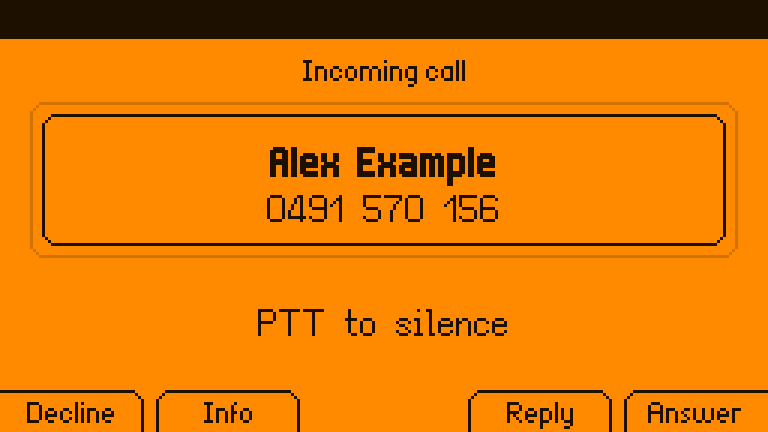
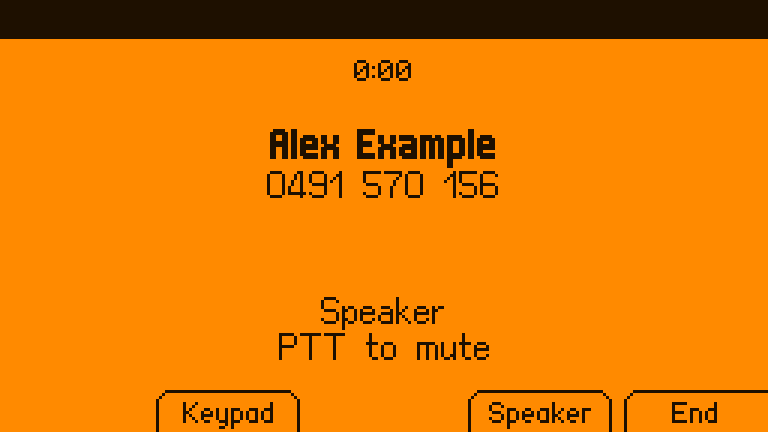
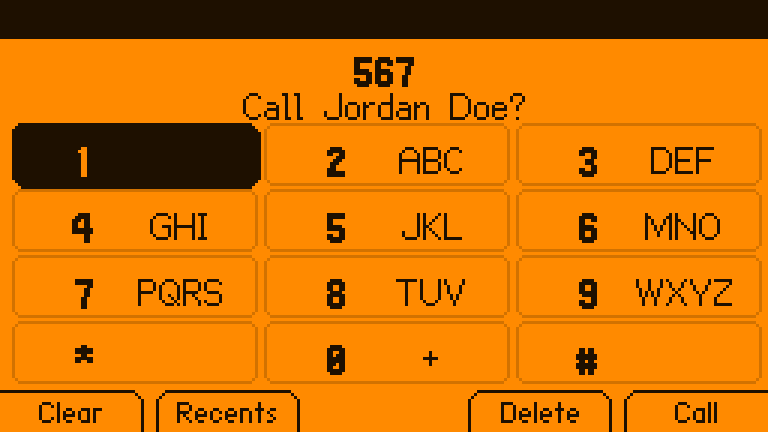
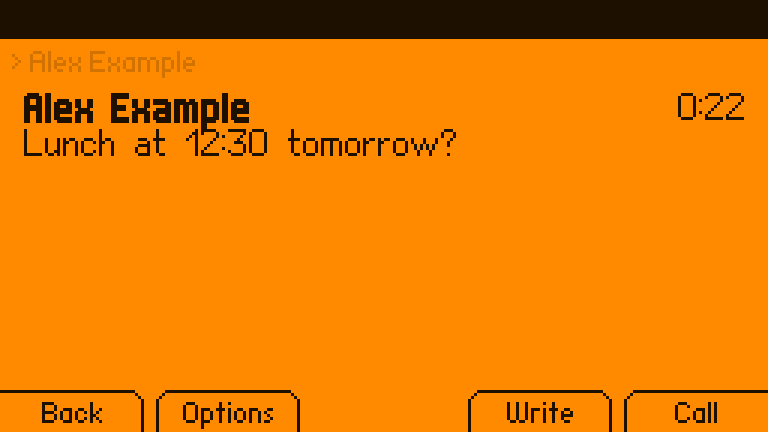
Unofficial. Dolphone is not made or endorsed by Flipper Devices. Not for emergencies. It passes 000/112/911 to the modem, which the network treats as emergency calls, and never blocks them, but it is hobby software on a pre-release device: carry a real phone.
What it does
| Calls | Dial, answer, decline, hold, swap and merge (conference), call waiting, keypad tones, mute; speed dial (hold 2–9) and voicemail (hold 1); T9 name matching; the country’s own busy and ringback tones; a call log with missed calls |
| Calls over the internet | A SIP account (through baresip) for when there is no signal, or always, receiving texts over SIP too; same screens, buttons and headsets; a SIP call and a mobile call can be held and swapped. Emergency calls always go over the mobile network |
| Texts | Conversations, multipart texts with a live segment counter, quick replies, delivery reports, resend for a failed text, search, export to Android (SMS Backup & Restore) |
| Picture messages and group texts | MMS through mmsd-tng: pictures shown in the desktop app, group conversations as one thread, replies to everyone |
| Carrier services | Call forwarding (**21*n#, *#21#, ##002#), caller ID (#31#), call waiting, and USSD balance codes from the keypad; a check of the modem’s own setup for calls (USB audio, VoLTE, the carrier profile) that sets it right with one press |
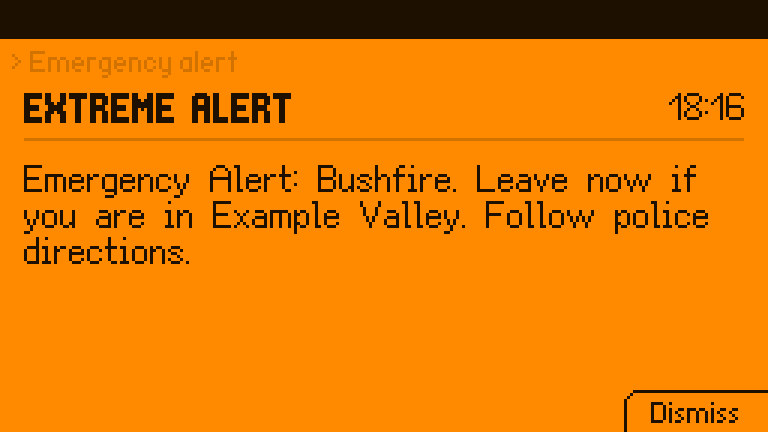
| Emergency alerts | Cell broadcast (national, extreme, severe, Amber, test), full screen over everything, sounding through silent mode |
| Audio | Built-in speaker (with echo cancellation), 3.5 mm headsets and speakers, Bluetooth headsets (HFP) and speakers (A2DP), an earpiece where the machine has one; calls follow a headset in and out; music pauses for a call; the LEDs flash for a ringing call if you like |
| Contacts | .vcf files; copy your phonebook from your current phone over Bluetooth (no account, no sign-in), or import an export from Google or iCloud; names and numbers only |
| The panel | FlipCTL apps under Apps > Phone that use every button the way FlipCTL means it: Run answers, Escape declines, PTT mutes (and held, switches the ringer), the touchpad taps the keypad, the motor has a vibration for each kind of news |
| Desktop mode | A full desktop app with keyboard shortcuts, notifications with Answer / Decline / Reply, a tray icon, tel: and sms: links, and Copy for one-time codes |
| Your laptop | KDE Connect (GSConnect on GNOME): texts and call alerts on a laptop on the same network, and replies from it, paired on the device |
| Scripts | phonectl (with --json), a D-Bus API, standing grants (“this program may text these numbers, 4 an hour”), rules that run a command when a matching text arrives, an optional local SMS gateway (HTTP), texts when the uplink goes down, and an audit log of what programs asked for |
| Safety | Premium numbers and short codes always need a press on the device; outside programs wait for one to dial, text, or change contacts, and cannot read messages, answer, or change settings unless you allow it; rate limits; blocked numbers; silence for unknown callers; a warning when the network forces 2G, and a switch to refuse it; the message store can be encrypted, its key sealed to the machine |
| The phone’s state | SIM PIN on the keypad; a Today screen of missed calls and unread texts; stays awake for calls and catches up after sleep; follows the modem through resets; records which SIM each text and call went through |
How it fits together
 FlipCTL (unchanged)        Dolphone apps on the panel         dolphone-desktop    phonectl
        │                    Phone · Messages · Settings        (desktop mode)     (scripts)
        │ flipctl open                 │                              │                │
        └──────────────┐               │      D-Bus (session)        │                │
                       ▼               ▼                              ▼                ▼
                  ┌──────────────────────────────────────────────────────────────────────┐
                  │ phoned: calls, texts, alerts, call audio, contacts, Bluetooth, the store │
                  └───────┬───────────────┬────────────────┬──────────────┬─────────────┘
                          │ D-Bus (system)│ PipeWire       │ BlueZ        │ baresip
                     ModemManager      speaker / jack /   headsets,      SIP calls
                          │            Bluetooth / modem  phonebook
                     M.2 modem (RM520N-GL)
phoned is the only thing that talks to ModemManager’s voice and messaging and the only thing that routes call audio, so the panel, the desktop and your scripts never disagree about a call. More in docs/ARCHITECTURE.md.
Status
Everything above works against fake-mm, a stand-in ModemManager that mmcli
itself accepts, and a second baresip playing the far end of SIP calls. The tests:
- 224 end-to-end checks (
scripts/e2e.sh): phoned, the fake modem, a fake mmsd-tng and phonectl playing through calls, texts, MMS, alerts, SIM PIN and SIM codes, an emergency call with the SIM locked, SIP, service codes, the modem’s setup, grants, rules, contacts, the encrypted store, serial call audio through real PipeWire, and what an untrusted script is and is not allowed to do; they also pass with every CPU core busy, as a stand-in for a slow device; - 5 live UI tests (
scripts/ui-e2e.sh): the Dialer, Messages, Settings and the desktop app (and its tray icon), driven through their real input against a live phoned, with a screenshot of each step; - 10 KDE Connect checks (
scripts/kdeconnect-e2e.sh) against the real kdeconnectd: pairing, texts both ways, a ringing call; - 184 unit tests, including every panel screen rendered and checked against the panel’s fonts.
Before release it had thirty reviews: ten for features and fit, then twenty more on security from a same-user program and from the network, Rust robustness, concurrency, data integrity, packaging, the modem, audio, emergency calling, telephony standards, numbers abroad, accessibility, the scripting API, the tests themselves, onboarding, FlipCTL’s conventions, licensing, battery use, failure recovery and privacy. What they found is fixed or written down in ROADMAP.md.
The panel apps also run in the real FlipCTL (its browser view, in a VM). Dolphone has not yet carried a real call: that needs the hardware test in docs/HARDWARE.md, whose deciding question is whether the RM520N-GL’s USB audio gives Linux two-way call audio.
Install on the Flipper One
Flipper OS is Debian 13 (arm64):
sudo apt install ./dolphone_0.1.0_arm64.deb   # built with scripts/package-deb.sh until the first release
dolphone-install-apps                          # as yourself: Apps > Phone on the panel
The install asks one question: whether Dolphone may send setup commands to the modem,
which turns on ModemManager’s debug mode (yes by default on a Flipper One, where call
audio needs it; sudo dolphone-modem-access on|off changes it later, and port on
gives Dolphone a spare AT port instead, untested on a real modem). The package
recommends what the optional parts use: mmsd-tng for picture messages and group texts,
baresip for SIP, bluez-obexd for copying contacts from a phone, wl-clipboard or xclip
for Copy, and suggests espeak-ng for spoken caller ID. More in docs/install.md.
Other devices
Dolphone is built for the Flipper One, and its panel apps are FlipCTL’s. Underneath,
phoned only needs Linux, ModemManager, PipeWire and BlueZ, so the daemon, phonectl
and the desktop app run on other machines with a modem too. What differs between
machines (mixer controls, where the modem’s audio is, which front ends fit) is a
device profile: one TOML file, picked automatically and shown by
phonectl device. These ship:
| Device | Status | What works |
|---|---|---|
| Flipper One | expected | everything: the panel apps, desktop mode, the CLI |
| ClockworkPi uConsole (4G extension) | untested | calls (the SIM7600’s serial call audio bridged to PipeWire), texts, SIP |
| Raspberry Pi with a USB modem or HAT | untested | texts, SIP calls; mobile calls where the modem offers USB audio |
| PinePhone | untested | calls through its UCM voice-call profile, on the earpiece first; texts, SIP |
| Purism Librem 5 | untested | calls (its modem is a separate sound card, bridged as on the Flipper), on the earpiece first; texts, SIP |
| Laptop | untested | the desktop app, SIP calls, texts and calls where the WWAN modem allows them |
| Anything else | expected | the generic profile: default devices, nothing touched |
Each profile says where its values came from; “untested” means nobody has run docs/HARDWARE.md on one yet. Adding a machine is one file, no code: docs/DEVICES.md. There is an amd64 package for laptops.
Try it without a Flipper One
On an Apple Silicon Mac with OrbStack:
scripts/dev-setup.sh                 # a Debian 13 arm64 machine, FlipCTL built, fake modem in
orb -m f1 scripts/run-dev.sh         # build, install, start; open http://f1.orb.local:8899/
orb -m f1 ~/.local/bin/phonectl fake ring 0491570156     # and watch the panel
orb -m f1 ~/.local/bin/phonectl fake sms 0491570156 "hello"
orb -m f1 ~/.local/bin/phonectl fake broadcast 4370 "Test alert"
More in docs/DEVELOPING.md.
From a shell
phonectl send --wait 0491570156 "build finished"   # waits for a press on the device, then for the network
phonectl mms 0491570156 --file photo.jpg "Look"    # a picture message (needs mmsd-tng)
phonectl modem setup                               # is the modem set up for calls? (apply to fix it)
phonectl otp --from 0491570156 --wait 60           # prints the code from the next text (needs a read grant)
phonectl grant 0491570156 4 30                      # ask to text it without asking, 4 an hour, for 30 days
phonectl --json watch                               # every event, one JSON object per line
phonectl contacts import ~/Downloads/contacts.vcf
phonectl device                                     # which device profile, and why
phonectl help lists the rest. For scripts, it exits 0 when done (or waiting
for the device), 1 when tried and failed, 2 when not allowed, 3 for a bad
argument or something this phone does not do, 4 over a rate limit, and 5 when
phoned is not running. Everything it does is on the D-Bus API, which busctl
and gdbus reach as well.
What is not done
- A real call. Everything is tested against stand-ins; the hardware test in docs/HARDWARE.md comes first, and with it the Quectel commands that only real firmware can confirm.
- A large-text mode, fonts beyond Latin and Cyrillic, and news outside Dolphone’s apps on the panel (a status-bar badge, a toast): FlipCTL has none of these, and Dolphone may add them later as options. Until then, names the font cannot draw fall back to the number.
- Sending texts to a SIP address: baresip 1.1.0 cannot; texts over SIP are received, and replies go over the mobile network.
- RCS: there is no route to it from Linux.
ROADMAP.md has the details.
Docs
- Install
- Buttons: every key on every screen
- Rules on incoming texts: run a command when a matching text arrives
- Architecture: the pieces and why they are split that way
- Audio: routes, echo cancellation, Bluetooth, the jack
- Devices: device profiles, and adding one
- Hardware bring-up: the go/no-go test with a real modem
- Developing: the dev machine, tests, bundles, packages
- Security: the threat model and what to report
- Contributing
License
Source: MIT. The panel apps and the desktop app link Slint (the panel apps through
flipctl-app) under GPL-3.0-only, so those binaries are GPL-3.0-only; each
release carries the full corresponding source, and the Debian package says where
it is in /usr/share/doc/dolphone/copyright. phoned, phonectl and the gateway are
MIT, with their dependencies’ notices in THIRD-PARTY-LICENSES.md (SQLCipher’s
among them). The panel fonts are CC BY-SA 3.0, Unlicense and MIT, and the AppImage
runtime at the head of each bundle has its own notices; see each bundle’s
NOTICE.md.
Install
On the Flipper One
Dolphone installs on Flipper OS (Debian 13, arm64) from the Debian package attached
to each release (until the first one,
build it with scripts/package-deb.sh on the device or any arm64 Debian 13 machine):
sudo apt install ./dolphone_0.1.0_arm64.deb
dolphone-install-apps            # as yourself: Apps > Phone on the panel
phonectl device                  # should say Flipper One
The package brings:
phoned | the phone daemon, started in every user session (systemd user unit, D-Bus activated) |
phonectl | the command line, for scripts |
dolphone-desktop | the desktop-mode app, with tel: and sms: links |
dolphone-install-apps | copies the panel apps (Phone, Messages, Phone Settings) into ~/Apps/Phone |
| device profiles | /usr/share/dolphone/devices/: how each machine’s audio is wired (Devices) |
| PipeWire and WirePlumber config | an echo canceller for speakerphone; Bluetooth hands-free |
| udev rules | let the modem wake the board for a call or a text, the dolphone group flash the Flipper One’s LEDs, and (when chosen) give that group a spare AT port of the modem’s |
dolphone-modem-access | turns ModemManager’s debug mode on or off, or gives Dolphone a spare AT port instead (see below) |
| a polkit rule | lets your active local session use the modem’s calls, texts, USSD and device control (which, in debug mode, includes AT commands) |
It needs ModemManager, PipeWire and WirePlumber (pulled in by apt), and conflicts with GNOME Calls and Chatty, which would race it for every call and text. It recommends, and apt installs unless told not to:
| Package | For |
|---|---|
baresip-core | calls over the internet (SIP) |
bluez, bluez-obexd | Bluetooth headsets, and copying contacts from your phone |
mmsd-tng | picture messages and group texts (MMS) |
pipewire-pulse | SIP call audio (baresip plays through PipeWire’s Pulse server) |
alsa-utils | the mixer commands device profiles run |
wl-clipboard or xclip | Copy in the desktop app |
espeak-ng (suggested) | saying who is calling |
The one question
The install asks: Let Dolphone send setup commands to the modem? Dolphone sets
the modem up for calls, tells it where call audio goes each time it starts, and runs
call forwarding and caller-ID codes, all as AT commands, which ModemManager passes on
only in its debug mode. Debug mode also makes ModemManager’s log more detailed, and
with an AT modem that log can hold numbers and texts. It also lets any program
running as you send the modem AT commands through ModemManager (mmcli --command),
around Dolphone’s confirmations. On a Flipper One call audio needs it, so yes is the
default there; elsewhere it is no. Change it any time:
sudo dolphone-modem-access on        # or off, or status
sudo dpkg-reconfigure dolphone       # ask again
On a Quectel RM520N-GL there is another way, not yet tried on a real modem: a spare AT port that ModemManager is told to leave alone, which phoned uses itself, so debug mode can stay off. It is not part of the question, since it depends on the modem:
sudo dolphone-modem-access port on   # or port off
sudo dolphone-modem-access off       # debug mode, if it was on
sudo adduser $USER dolphone          # the port's group; then log in again
phonectl modem setup                 # says which way the commands go
Devices has the details, and how to do it for another modem.
Phone Settings > Modem shows Turn on when it is off, with a password prompt.
After installing
- Contacts: in Phone Settings > Bluetooth, pair your current phone and press
View on it to copy its contacts (allow it on the phone); or
phonectl contacts import contacts.vcfwith an export from contacts.google.com or icloud.com; or drop.vcffiles into~/.local/share/dolphone/contacts/. Only names and numbers are kept. - Voicemail: Phone Settings > Calls > Voicemail number (some carriers’ numbers are known and filled in from the SIM).
- Calls over the internet: Phone Settings > Calls over the internet, with your SIP provider’s address, password and (if they give one) proxy.
- Board audio: if the speaker or the jack stays silent, the profile’s mixer controls do not match your board; see Devices and Audio.
- Modem setup: Phone Settings > Modem says whether the modem is set up for calls
(USB audio, VoLTE, the carrier profile); Set up makes the changes and restarts
it.
phonectl modem setupis the same from a shell. - Picture messages: with
mmsd-tnginstalled, MMS just arrives. If it does not, the carrier’s MMS settings (MMSC, proxy, APN) are in~/.mms/modemmanager/mms(stop mmsd-tng before editing it). - LEDs for a ringing call:
sudo adduser $USER dolphoneand log in again; they flash while a call rings (theflash_on_ringsetting, on by default). - An encrypted message store:
systemctl --user stop phoned, thenphoned --encrypt-store, thensystemctl --user start phoned. The key is sealed by systemd to you on this machine;phoned --decrypt-storeundoes it. See Security for what it does and does not protect. - Scripts that read messages (an OTP reader, say) need a read grant:
phonectl set read_grants phonectl, allowed on the device. Grants go by program name, so a grant tophonectlis a grant to every script that uses it. Scripts that text without asking each time need a standing grant:phonectl grant <numbers> <per-hour> <days>, allowed once on the device.
On other machines
The same package (arm64), or the amd64 one for a laptop, installs on any Debian 13
machine; the panel apps are only in the arm64 package and only useful under FlipCTL.
phonectl device says which profile phoned picked; Devices has what
works where and how to add a machine.
Without any hardware
The whole stack runs against fake-mm, a scriptable stand-in modem, on an Apple Silicon Mac with OrbStack or any arm64 Debian 13 machine. See Developing.
Buttons
Dolphone keeps FlipCTL’s roles for the five soft keys everywhere: Escape backs out or cancels, View switches view or shows information, Edit edits, Run does the main thing. The middle soft key, silkscreened power, does reach the app in front (flipctl forwards it like the other four), but Dolphone leaves its slot empty on purpose: a press meant for the phone’s power is never taken as Answer, End or Allow. Back and the app switcher never reach an app: flipctl keeps them. Back leaves the app (on a call, the call carries on; come back to it with the switcher), and the switcher lists running apps, a live call among them.
A hold is 0.6 s or more by default (the long_press_ms setting, 300–3000 ms).
The touchpad is read by the app that has the keyboard, the one in front; an app in the background ignores it.
Dialer
| Screen | D-pad / Ok | Escape | View | Edit | Run | PTT | Touchpad |
|---|---|---|---|---|---|---|---|
| Keypad | move, press a key; hold 0 for +; on an empty keypad hold 1 for voicemail, hold 2–9 for speed dial | clear, then exit | Recents | delete (hold: clear) | Call (empty: redial; a name matched by its letters, “567” for Jordan: call them) | hold: Ring → Vibrate → Silent | tap a key, swipe to move |
| Keypad, SIM locked | type the PIN (shown as *) | clear | Recents | delete | Unlock (an emergency number still dials) | tap a key | |
| Recents | move | back | Contacts | text | call back | swipe | |
| Contacts | move, Left/Right jump a letter; Ok calls, hold Ok to give the contact a speed-dial key | back | Keypad | text | call | swipe | |
| Speed dial picker | choose 2–9 | back | clear that key | set | |||
| Incoming call | Decline (hold, with “Hold to decline” on) | number details | reply with a text | Answer | silence the ringer | ||
| Reply picker | choose | back | send and decline | ||||
| In call | Ok swaps two calls; hold Ok merges them | keypad | audio route | End (ignored for 1.5 s after answering) | mute / unmute | ||
| In-call keypad | move, Ok sends the tone | close | close | audio route | End | tap a key | |
| Emergency alert | Ok dismisses | dismiss | Dismiss (Next while more wait) | ||||
| Confirmation | Deny | Allow | |||||
| Service code reply | close | reply on the keypad |
Emergency alerts not yet dismissed wait in turn rather than replacing each other: the most severe first (National, Extreme, Severe, Amber, Test), alerts of one level in the order they came, with “1 of 3” in the breadcrumb while more wait. A worse alert arriving takes the screen at once; the one it covered comes back after it.
Keys are ignored for 400 ms after a call, an alert or a confirmation appears unasked, so a press meant for whatever was on screen cannot answer a call or allow a request. A press ignored like this, End in the 1.5 s after answering, and a short press of Decline when it needs a hold each give the “refused” stutter, so a press that did nothing does not feel like one that did.
The touchpad works as a keypad once it has learnt its own size from a few strokes; until then it moves the selection like the D-pad.
Vibrations
Each kind of news has its own feel, so it can be told in a pocket. Messages uses the same feel for a text. Everything but a key, a thump, a refused press and an emergency alert stays still when the ringer is on Silent.
| a key | a tick |
| a call connects or ends | a thump |
| a text | two short |
| a missed call | three short |
| a second call waiting | two long |
| a call dropped (not ended here) | one long |
| a text not sent | short, short, long |
| an emergency alert | the alert tone’s rhythm (long, short, short, twice), even on silent |
| a press ignored on purpose | a quick stutter (three very short) |
Messages
| Screen | D-pad / Ok | Escape | View | Edit | Run |
|---|---|---|---|---|---|
| Threads | move, Ok opens | exit | new message | open | |
| Conversation | Up/Down scroll, Left/Right page, Ok writes | back | options | write | call |
| Options (Resend failed text, Quick reply, Attach a picture, Call, Block, Delete) | move | back | back | select | |
| Quick reply | choose | back | edit it first | use (to the preview) | |
| Attach a picture | choose, Ok as Run | back | Add (to the preview), or Remove one already added | ||
| Keyboard (FlipCTL’s) | type | cancel | 123 | backspace | done |
| Preview | edit again | Attach (Pictures once one is added) | edit again | Send | |
| Locked (a Messages PIN is set) | Ok types the PIN | exit | type the PIN | Unlock: type the PIN | |
| PIN keyboard (opens on 123, the PIN shown as *) | type | exit Messages | ABC | backspace | Unlock (4 to 12 digits) |
With a Messages PIN set (Settings > Privacy), Messages opens on the PIN and shows nothing of the texts until it is right; it stays open for the time set there, then asks again. A wrong PIN says so; after five, phoned makes you wait. A number the Dialer hands over while locked opens once the PIN is in.
Attach a picture lists the newest 50 pictures (JPEG, PNG, GIF, WebP) in the
Pictures and Downloads folders (XDG’s, from user-dirs.dirs, else ~/Pictures and
~/Downloads) and the folders directly in them, with each one’s size and date. Links
are not followed, and a file phoned would not send (empty, unreadable, over 8 MB) is
left out. What is added is named above the text on the preview, which is then a
picture message (a text is optional); to take one off, open the pictures again and
Remove it. Up to 10, 8 MB in all, go in one message; a group’s goes to everyone.
Without pictures the preview sends a text, as before.
A picture message shows its text with [Picture] (or [Audio], [Contact]) below:
the panel is too small for the picture, which the desktop app shows. A group
conversation is one thread, named after everyone on it; a reply goes to all of them.
Phone Settings
| Left / Right | Ok / Run | Edit | View | Escape | |
|---|---|---|---|---|---|
| ON/OFF rows | toggle | toggle | up a page | ||
< value > rows | step | step | up a page | ||
| Pages (Call audio, Bluetooth, Laptops, Calls, Calls over the internet, Texts, Emergency alerts, Privacy, Modem, About) | Right opens | open | up a page | ||
| Typed rows (voicemail number, SIP account, password, proxy) | open the keyboard | open the keyboard | up a page | ||
| Bluetooth device | pair / connect / disconnect | forget | copy contacts (a paired phone) | ||
| Blocked number | unblock | unblock | |||
| A program allowed to text | revoke | revoke | |||
| Privacy > Messages PIN | Right sets | Set / Change: the new PIN on the keyboard, then again | Remove (asks first) | up a page | |
| Privacy > Messages stay open | step 1, 5, 15 min | step | up a page | ||
| Modem page | Set up when the modem’s setup has changes to make, or Turn on when ModemManager’s debug mode is off; both ask first | up a page |
Desktop app
| Keys | |
|---|---|
| Ctrl+1 … Ctrl+4 | Calls, Messages, Contacts, Settings |
| Ctrl+N | a new message |
| Ctrl+Enter | answer the ringing call |
| Ctrl+Backspace | decline the ringing call, or end the live one |
| Ctrl+M | mute or unmute |
| Tab, Shift+Tab | the next or last control; over a call, a confirmation or an alert, round that card’s own buttons only |
| Up, Down | along a list (calls, conversations, contacts, the lists in Settings) |
| Enter | a list row’s main thing (call, open, unblock…), or press the control with the focus |
| Space | choose a list row, or press the control with the focus |
The call card opens with the focus on Answer (on Keypad once the call is live, away from End); a confirmation on Deny; an alert on Dismiss (Next alert while more wait, with “1 of 3” beside the time; the most severe comes first).
With a Messages PIN set, the Messages page is a PIN field and Unlock (Enter unlocks too) until it is right; once open, Lock beside New closes it again. Settings > Messages PIN sets or changes it (the new PIN twice), removes it, and picks how long Messages stays open (1, 5 or 15 minutes).
In a conversation, Attach opens the desktop’s file chooser (through the XDG desktop portal) for pictures; what is picked is named above the text, Remove drops it, and Send sends the lot as one picture message. Without a portal, Attach says so.
Rules on incoming texts
A rule runs a command when a matching text arrives: a text that says STATUS gets
the uplink’s state back, a text with a code reboots a router, a one-time code is
handed to a script. Rules live in ~/.config/dolphone/rules.json, a list:
[
  { "from": "+61491570156", "contains": "STATUS", "secret": "4821",
    "run": ["/usr/local/bin/wan-status"], "reply": true },
  { "from": "*", "contains": "Your code is", "run": ["/home/me/bin/otp-to-clipboard"] }
]
| Field | ||
|---|---|---|
from | required | the sender, in any form (0491 570 156, +61491570156), or * for anyone |
contains | optional | text the message must contain, ignoring case |
secret | optional | text it must also contain, exactly: a shared password for rules that do something |
run | required | the program and its arguments; run directly, never through a shell |
reply | optional | true to text back what the program prints |
A field phoned does not know makes the whole file invalid (it says so in its log)
rather than being ignored: a misspelled "contains" would otherwise leave a rule
that fires on every text from that sender. phoned reads the file again for every
text, so changes count at once.
What the program gets
The text as JSON on its standard input:
{"from": "+61491570156", "body": "STATUS 4821", "at": 1793228520}
at is when it was sent, in Unix seconds. The program has 30 seconds; after that it
is stopped. Every rule that matches runs, each on its own, at the same time.
With "reply": true, what the program prints (up to 600 characters) is texted back
to the sender, but only to a sender the rule names: a rule for * never replies,
so a rule cannot be made to text anyone who writes to it. A program that exits with
an error sends no reply, and what it printed to its standard error goes to phoned’s
log (journalctl --user -u phoned), for you to see why.
What never runs a rule
- Texts that arrive over SIP: a SIP sender is not authenticated the way a mobile network’s is, and a reply goes out as a text on your account.
- Texts from blocked numbers, and flash texts, which are shown and not kept.
An example: STATUS
#!/bin/sh
# /usr/local/bin/wan-status: say whether the uplink is up.
ip -brief link show eth0 | awk '{print "eth0 is " tolower($2)}'
With the first rule above, texting STATUS 4821 from +61491570156 gets eth0 is up
back. For texting when the uplink goes down without being asked, see the
uplink_alert_to setting instead.
Architecture
The pieces
| Crate | Runs as | Job |
|---|---|---|
phone-core | library | numbers (canonical form, display, emergency / premium / short classes, prefixes), message text cleaning, SMS segment counting and one-time codes, vCard contacts (import, merge, edit), supplementary-service codes (TS 22.030), the store (SQLite, or SQLCipher when encrypted: messages with their MMS parts, calls, alerts, grants, audit; behind the db feature, which the panel apps leave out), the countries’ call-progress tones, local time |
phone-api | library | the D-Bus names, wire types and client proxies; a script author can use it alone |
phone-bus | library | a front end’s worker thread: subscribes to everything phoned says, runs calls off the UI thread, survives phoned restarting |
phoned | systemd user service | the phone: ModemManager client, call state, texts, MMS through mmsd-tng, emergency alerts, confirmations and grants, call audio (including a serial PCM bridge), ringer, tones and LEDs, Bluetooth and the phonebook copy, jack, SIP through baresip, KDE Connect, device profiles, the modem’s AT setup and service codes, rules on texts, uplink alerts, sleep and wake, desktop notifications, the store’s sealed key |
dolphone-gateway | optional user service | an HTTP SMS gateway on phoned’s API, localhost only by default |
phonectl | CLI | everything a front end can do, for scripts; phonectl fake ... plays the far end against fake-mm |
fake-mm | dev service | a ModemManager stand-in with one scriptable modem: calls, texts, delivery reports, cell broadcast, a SIM PIN, call waiting, conferences, AT commands as a Quectel answers them (refused without debug mode); and fake-mmsd, an mmsd-tng stand-in on the session bus |
apps/dialer, apps/messages, apps/settings | FlipCTL apps | the panel front ends (Wayland clients on flipctl’s compositor, drawn with flipctl-app’s widgets) |
apps/desktop | desktop app | the desktop-mode front end |
Rules the design keeps
- Add to FlipCTL, never replace it. No launcher, status bar or keyboard of our
own. The apps use FlipCTL’s widgets, fonts and soft-key roles; phoned raises them
with
flipctl open; SIM, APN and data settings stay in Flipper’s own 5G Modem app. What Dolphone sets on the modem is only what calls need: VoLTE, the carrier profile, USB call audio, and refusing 2G when asked. - One owner per thing. phoned is ModemManager’s only client for Voice and Messaging (NetworkManager and Flipper’s 5G Modem app read the same modem for data and signal, untouched; mmsd-tng takes the MMS notices from Messaging and fetches the messages for phoned), with one deliberate exception: PipeWire’s Bluetooth hands-free support follows ModemManager’s calls so a headset rings and its button answers, which is the only way to get that without reimplementing HFP. phoned is the only thing that routes call audio. Front ends never talk to either. The package conflicts with GNOME Calls and Chatty, which would race phoned for every call and text.
- Nothing waits on a UI thread, and nothing slow waits on phoned’s async threads.
Bus calls run in
phone-bus’s worker; PipeWire’s tools run on blocking threads with time limits. (A synchronouspw-dumponce froze call signals for 25 s.) - Untrusted input is cleaned once, on the way in. Sender names and bodies lose control characters, bidi overrides and zero-width characters, and are capped, before they reach the store, a log or a screen.
- The Flipper One first; other machines by data. Everything about the hardware
around the modem is a device profile (
dist/devices/*.toml, see DEVICES.md), so a new machine is a file, not a branch in the code. - Measured on the panel, in the fonts it draws. Every position on the panel is
computed in Rust, text is wrapped and cut with the bitmap font that will draw it,
and the screens are rendered headlessly in tests (
DOLPHONE_RENDER=1 cargo test).
A call, end to end
- The network rings. ModemManager adds a Call object and emits
Voice.CallAdded. - phoned reads the number, checks the block list, starts tracking the call and
watching its
StateChanged, emitsCalls.CallAdded, starts the ringer (PipeWire, notification role), runsflipctl open <Dialer bundle>and posts a desktop notification if a desktop is running. - The Dialer comes up on the panel (FlipCTL starts it or brings it forward) and shows the incoming screen, ignoring keys for 400 ms so a press meant for the app underneath cannot answer. It vibrates the motor while the call rings.
- Run answers: Dialer →
Calls.Answer→ phoned →Call.Accept(orVoice.HoldAndAcceptwhen another call is live). - ModemManager reports
ACTIVE; phoned stops the ringer, starts the two PipeWire loopbacks for the chosen route (modem ↔ speaker with echo cancellation, jack, or Bluetooth), and emitsCallChanged. Every front end shows the call. - End (Run, after a 1.5 s lockout), the far end hanging up, or the headset button:
TERMINATED. phoned logs the call (answered, missed, declined, cancelled, blocked), tears the audio down, emitsCallRemoved, posts a missed-call notification if it was one, and has ModemManager delete the Call object.
A SIP call
phoned runs its own baresip (config and account in ~/.config/dolphone/sip/, 0600)
and drives it over baresip’s D-Bus control module, listening only to the connection
whose process it started. baresip’s events (CALL_INCOMING, CALL_ESTABLISHED,
CALL_CLOSED …) move a SIP call through the same states as a cellular one, so it
is the same Live call to every front end, with internet: true. Audio is
baresip’s own, through PipeWire: phoned points it at the route’s output and
microphone with auplay/ausrc as the route changes. Which network a call takes is
decided in Phone::dial: a SIP address always SIP, an emergency number never, and
otherwise the owner’s choice (always, or only with no mobile signal).
A text, end to end
Incoming: Messaging.Added → phoned waits for a multipart message to finish
arriving, cleans sender and body, drops it if blocked, stores it, emits
MessageAdded and notifies, then deletes it from the modem’s storage (a full modem
stops accepting texts). Then the owner’s rules (~/.config/dolphone/rules.json) run for a matching text,
with the text as JSON on stdin and no shell. Outgoing: Messages.Send → confirmation
rules (or a standing grant) → stored as Sending → Messaging.Create + Sms.Send →
Sent or Failed → with delivery reports on, the modem’s copy is kept until the network
reports Delivered, then deleted.
An emergency alert
phoned tells the modem’s CellBroadcast interface which channels to listen to (the
3GPP alert ranges). Each Cbm is classed by its channel (national, extreme, severe,
Amber, test, information), dropped if the owner turned that class off (national
never can be), stored once however often it is rebroadcast, announced as
Messages.AlertReceived, sounded with the alert tone whatever the ringer says, put
full screen on the panel and the desktop, and deleted from the modem.
Confirmations
Dialling or texting from an outside program (a script, phonectl, another app),
any premium number or short code from anyone, an emergency number from an outside
program, and wiping the store all wait as a Request. phoned shows it on the panel
(by raising the Dialer) and the desktop; only a press there, or a click in the
desktop session, lets it go. Requests expire after two minutes. Who is “inside” is
decided by the executable behind the D-Bus caller; see SECURITY.md for what that
does and does not protect.
A standing grant lets one program text listed numbers (or a prefix) without
asking each time, up to its own hourly limit and until a date; it is asked for with
Settings.RequestGrant, allowed once on the device, and revoked in Phone Settings.
Premium, short and emergency numbers can never be granted. Every outside request is
written to the audit log (numbers masked), shown in Phone Settings.
Where things live
| What | Where |
|---|---|
| Messages, call log, alerts, grants, audit, blocks, settings | ~/.local/share/dolphone/dolphone.db (0600) |
| MMS pictures and other parts | ~/.local/share/dolphone/mms/ (0700) |
| KDE Connect: this device’s certificate, paired laptops | ~/.local/share/dolphone/kdeconnect/ |
| Contacts | ~/.local/share/dolphone/contacts/*.vcf |
| The store’s sealed key (when encrypted) | ~/.config/dolphone/store-key.cred |
| The SMS gateway’s token | ~/.config/dolphone/gateway.token (0600) |
| Device profiles | built in; /usr/share/dolphone/devices/; ~/.config/dolphone/devices/ |
| The owner’s audio overrides | ~/.config/dolphone/audio.json |
| Rules on incoming texts | ~/.config/dolphone/rules.json |
| SIP: baresip’s config, account and password | ~/.config/dolphone/sip/ (0700; accounts and password 0600) |
| Ring tones, handoff file, desktop socket | $XDG_RUNTIME_DIR/dolphone/ |
| Panel apps | ~/Apps/Phone/dolphone-*-aarch64.fap.AppImage |
Audio
phoned owns call audio. FlipCTL pins a hosted app’s sound to the panel speaker and keeps it away from the sound card, so no app could route a call even if it wanted to.
Routes
| Route | Output | Microphone | Echo cancelled |
|---|---|---|---|
| Speaker | the codec, speaker side (dolphone_ec_sink) | the device mic (dolphone_ec_source) | yes, WebRTC in PipeWire |
| Headset (3.5 mm) | the codec, headphone side | the headset’s mic (TRRS) | no |
| Bluetooth | the headset’s sink, switched to its hands-free profile for the call | the headset’s mic | the headset’s own |
| Earpiece (phones that have one) | the codec’s earpiece, switched by the profile’s earpiece_commands | the device mic | no |
A mobile call is two pw-loopbacks phoned starts when the call connects:
dolphone-downlink:  modem capture  ─▶ output for the route
dolphone-uplink:    mic for route  ─▶ modem playback
Mute stops the uplink only. Changing route mid-call restarts only the loopback whose end moved (speaker to headset on the codec moves neither: only the mixer commands run), so the other side of the call is not cut. They stop when the last call ends. An outgoing call’s audio starts while it rings out, for the network’s own ringback and announcements.
Starting and stopping are asked for without waiting and carried out in order on
one audio thread, so a call that ends quickly cannot have its stop run before its
start. Each loopback’s streams carry node.dont-reconnect and node.dont-fallback,
so when their device goes WirePlumber ends them rather than moving them to the
default device (wireplumber’s linking/prepare-link.lua); during a call phoned
checks every couple of seconds and starts again any loopback that has died, which
also brings a call’s audio back after PipeWire restarts.
On the speaker the call goes through the echo canceller
(dist/pipewire/dolphone-echo-cancel.conf). Its own streams name no device, so
when a speaker call starts phoned points them at the profile’s codec_sink and
mic_source (target.object in PipeWire’s default metadata, which WirePlumber
honours: linking/find-defined-target.lua); otherwise they would follow the
default sink and source.
On Bluetooth a headset is usually in A2DP, which has no microphone. When a call
starts there phoned switches it to the highest-priority profile with an input
route (headset-head-unit, HFP/HSP, as WirePlumber’s own
device/autoswitch-bluetooth-profile.lua picks), with
pw-cli set-param <device> Profile '{ index: N, save: false }' so the choice is not
remembered, waits for the headset’s microphone to appear, and starts the
loopbacks. The old profile comes back when the call ends or leaves Bluetooth.
A SIP call’s audio is baresip’s: it plays and records through PipeWire itself,
and phoned points it at the route’s output and microphone (auplay, ausrc) when
the call connects and whenever the route changes. Mute is baresip’s mute.
What switches routes
- Edit in a call cycles Earpiece → Speaker → Headset → Bluetooth, skipping what is not there; a call starts on the earpiece where the profile has one, otherwise on the speaker (and the desktop app’s route menu sets one).
- A headset plugged into the jack takes the call; unplugging it falls back to the
speaker. phoned reads
SW_HEADPHONE_INSERTfrom whichever input device reports it, and notices a device that goes away and comes back. It watches/dev/inputwith inotify rather than rescanning it on a timer, so nothing wakes while nothing changes: a newevent*node (or udev giving it its permissions) brings a rescan at once and another a second later. Underneath that is a rescan once a minute, for when/dev/inputcannot be watched, and one whenever a watched device goes. - A Bluetooth headset connecting takes the call; it disconnecting falls back to the jack or the speaker.
- A route the user picked by hand stays until the call ends, except that a device disappearing always falls back.
The machine’s own wiring: device profiles
Which mixer controls switch speaker and headphones, which sink and source to use,
how to spot the modem’s audio card, and anything to run as a call starts and ends
are the device profile’s (DEVICES.md). On the Flipper One that
is the NAU8822’s Speaker Playback Switch and Headphone Playback Switch, switched
with amixer, because the driver has no UCM profile; its jack and headset button are
watched by the RP2350, which passes them on. A phone whose modem is wired to the
codec (the PinePhone) needs no loopbacks, only its UCM Voice Call verb, which its
profile runs with call_start_commands.
~/.config/dolphone/audio.json (example in dist/audio.example.json) overrides any
key of the profile, for the machine in front of you.
Some modems send call audio over a serial port instead of a sound card: the
SIMCom SIM7600 in the uConsole’s 4G extension sends mono 16-bit PCM on its audio
port once AT+CPCMREG=1 is sent (SIMCom’s USB AUDIO Application Note V1.03, §2).
ModemManager’s SIMCom plugin does that itself (plugins/simtech/mm-shared-simtech.c):
it sends AT+CPCMREG=1 and =0 as a call’s audio starts and ends, names the port
as the call’s AudioPort, and reports the rate in its AudioFormat, 8 kHz or 16 kHz
where the firmware has AT+CPCMFRM=1. So the profile sends nothing, and needs no
ModemManager debug mode. phoned uses the call’s AudioPort, or else the profile’s
serial_pcm, and bridges it with two pw-cat processes at that rate (8 kHz when
none is reported), one each way, as nodes dolphone-downlink and
dolphone-uplink. The port is flushed each time a leg starts, so stale bytes
never play as noise. The port needs the dialout group.
The modem’s PCM clock and the sound card’s are different clocks, so over a long
call one runs ahead of the other. With pw-cat on the port directly, latency
would grow without bound in the port’s buffer, or the stream would run dry. So
phoned’s own thread sits between the port and both pw-cats:
modem port ─▶ [serial-pcm thread] ─▶ pipe ─▶ pw-cat --playback   (downlink)
modem port ◀─ [serial-pcm thread] ◀─ buffer ◀─ pw-cat --record   (uplink)
It reads the port 20 ms frame by frame. Each frame goes into the downlink’s pipe,
and for each one, one frame of the uplink goes back to the modem. The uplink so
runs at the modem’s own clock, and its buffer in phoned is the only place the
drift collects. The downlink’s buffer is the pipe itself, whose fill the kernel
reports (FIONREAD), so it counts what pw-cat has really taken. Each buffer may
wander between 20 ms and 200 ms. Past either bound it is brought back to 60 ms,
a whole frame at a time: frames are dropped, or silence is added. A buffer whose
low point has stayed over 60 ms for a second is trimmed back to it too, so
latency picked up once (a stream’s start, a stall) does not last the call. At a
realistic drift that is a 20 ms skip or gap every few minutes. If the modem sends
nothing for 200 ms, the uplink carries on at phoned’s own clock. While muted, the
modem gets silence.
pw-cat‘s raw mode goes through stdio, which moves 4096 bytes at a time: 256 ms at
8 kHz, read ahead of playing and written in bursts. phoned runs both legs under
coreutils’ stdbuf -i0 -o0 (it then runs pw-cat itself, so ps shows pw-cat),
which makes pw-cat move 5 to 20 ms at a time. Both legs also ask for
--latency 20ms. Without stdbuf the bridge allows for the bursts: it estimates
what pw-cat has read but not yet played, and raises the uplink’s drop bound by
the largest burst seen.
The modem’s own sound card, where it has one, is given the lowest
priority.session by dist/wireplumber/51-dolphone-bluetooth.conf, so it never
becomes the default sink or source.
Ringing and tones
phoned synthesises its sounds into $XDG_RUNTIME_DIR/dolphone/ (or
~/.cache/dolphone/ without a runtime directory; never a shared directory, and
always 0700) and plays them with pw-play:
- the ring (400 ms on, 200 off, 400 on, 2 s off, at 400+450 Hz with a little of
the octave so it carries from a small speaker), in the Notification role, on the
profile’s
codec_sink(the default sink may be an idle Bluetooth headset or the modem). While it rings the profile’sspeaker_commandsrun, since a profile whose jack route mutes the speaker would otherwise ring silently; afterwards, and after a call, the codec goes back to the jack if a headset is in it and to the speaker if not. The Dialer runs the motor alongside, and PTT silences; - the call-waiting pips, in the ear: on the call’s output;
- the text tone, when the ringer is on;
- the alert tone for emergency alerts, in the Alarm role, whatever the ringer
says. It is 853 Hz and 960 Hz together, the attention signal alert systems use.
Its cadence is Wireless Emergency Alerts’ (47 CFR 10.520): a 2 s tone, then two
1 s tones, 0.5 s between each, the whole sequence twice with 0.5 s between,
10.5 s in all. It is the same in every country, as on Android, whose alert app
plays one tone outside Japan; EU-Alert (ETSI TS 102 900) leaves the form to each
country (
ALERT_ATTENTIONinphone-core/src/tones.rs); - the call-progress tones of the country the SIM (or the owner’s setting) says
you are in: busy and congestion after the network turns a call away, and, for
networks that send silence while ringing out, ringback (Phone Settings > Calls >
Ringback on this phone). The cadences are ITU-T E.180’s, country by country, in
phone-core/src/tones.rs. They play on the call’s output (after the call, the route’s), not the default sink; - the caller’s name, spoken with espeak-ng when “Say who is calling” is on. The
name goes to espeak on its stdin, not its command line (which any user can read
in
/proc), and the speech is deleted once played.
Music playing on the machine (anything speaking MPRIS) pauses when a call rings and resumes when the last call ends.
Bluetooth headsets
dist/wireplumber/51-dolphone-bluetooth.conf turns on the hands-free Audio Gateway
roles and PipeWire’s ModemManager integration, so a headset rings and its button
works, and mSBC for wideband (16 kHz) call audio where the headset has it. Pairing goes through phoned’s BlueZ agent, which only accepts a pairing the
owner started from a Dolphone screen in the last minute, and shows the passkey there.
Lessons kept
- PipeWire clients in a systemd user unit with any sandboxing option (ProtectSystem, NoNewPrivileges, PrivateTmp) stall for seconds to 25 s. phoned’s unit has none.
pw-dumpinto a pipe can take seconds where the same dump to a file takes milliseconds; phoned dumps to a file, with a time limit.- Every command phoned runs for audio (mixer commands,
pw-cli,pw-dump) has a time limit, since they run with the audio state locked and a stalled one would hold up the call. - In containers where RTKit cannot run (OrbStack), every PipeWire client waits out
RTKit’s D-Bus timeout; the dev setup masks
rtkit-daemon.
Devices
Dolphone is built for the Flipper One: its panel apps are FlipCTL apps, its
buttons are the Flipper’s, and HARDWARE.md is the Flipper One’s
bring-up. Underneath, though, phoned only needs what any Linux machine with a modem
has: ModemManager for the modem, PipeWire for audio, BlueZ for Bluetooth, logind
and D-Bus. So the daemon, phonectl and the desktop app run elsewhere too.
What differs between machines is the hardware around the modem, and that lives in a device profile: one TOML file that says how to recognise the machine and how its audio is wired.
Which one am I using?
phonectl device          # the profile in use, and why it was chosen
phonectl device list     # every profile phoned knows
phonectl device use pinephone     # choose one by hand (auto to detect again)
Phone Settings > About shows it on the panel too.
The profiles that ship
| Profile | Recognised by | Status | Notes |
|---|---|---|---|
flipper-one | device tree model “Flipper One” | expected | The reference. NAU8822 codec switched with amixer (Speaker, Headphone, from the kernel driver’s controls); the modem’s USB audio bridged by phoned. The board’s device-tree strings are not published yet, so detection is assumed: choose it by hand if it misses. |
clockworkpi-uconsole | dtoverlay=clockworkpi-uconsole in config.txt | untested | The 4G extension is a SIMCom SIM7600G-H, which sends call audio as serial PCM. ModemManager’s SIMCom plugin turns it on (AT+CPCMREG=1) once a call connects and names the port; phoned bridges that port (or /dev/ttyUSB4) to PipeWire at the call’s rate, 8 or 16 kHz (SIMCom USB AUDIO Application Note V1.03). Needs you in the dialout group for the port. |
raspberry-pi | device tree model “Raspberry Pi” | untested | Any modem ModemManager supports. Mobile call audio needs a modem with a USB sound card; use a USB headset for the speaker and microphone. |
pinephone | pine64,pinephone | untested | The EG25-G is wired to the codec; ALSA UCM’s Voice Call verb connects it (call_start_commands); calls start on the earpiece. |
librem5 | purism,librem5 | untested | The BM818 is its own ALSA card (“Modem”), bridged to the codec by phoned, as on the Flipper One; calls start on the earpiece. |
laptop | SMBIOS chassis type (laptop, notebook, convertible), or ThinkPad | untested | The desktop app. Whether the WWAN modem can call and text depends on it: mmcli -m 0 lists Voice and Messaging when it can. SIP works regardless. |
generic | nothing else matched | expected | Default devices, no mixer controls touched. |
“Untested” means the values come from the sources each file cites (kernel device trees, alsa-ucm-conf, vendor documentation), but nobody has yet run the bring-up checks on that machine. Running them and reporting back, pass or fail, is the most useful contribution there is.
On the phones (PinePhone, Librem 5), stop callaudiod and GNOME Calls first: one program should own the modem’s calls and texts, and the package conflicts with GNOME Calls and Chatty for that reason.
Adding a device
Copy generic.toml (in /usr/share/dolphone/devices/ once installed, or
dist/devices/ in the repository) to ~/.config/dolphone/devices/, give it an id,
and fill in what you know:
id = "my-board"
name = "My Board"
status = "untested"              # tested once docs/HARDWARE.md passes on it
source = "where the values came from"
notes = "what works, what does not"
front_ends = ["desktop"]         # "flipctl" too, if it runs FlipCTL
ring_leds = []                   # names under /sys/class/leds to flash while ringing
modem_at = []                    # AT commands each time the modem appears
call_at_start = []               # AT commands when a mobile call connects
call_at_end = []                 # and when it ends (these four go above [match])

[match]                          # any one of these picks the profile
dt_compatible = ["vendor,board"]      # exact strings from /proc/device-tree/compatible
dt_model = ["My Board"]               # substrings of /proc/device-tree/model
dmi_vendor = []                       # substrings, on machines with DMI (x86)
dmi_product = []
dmi_family = []
dmi_version = []
dmi_chassis = []                      # SMBIOS chassis types: 9 laptop, 10 notebook...
file_contains = [["/etc/hostname", "myboard"]]
priority = 50                         # higher wins when several match

[at_port]                        # a spare AT port of the modem's (see below)
usb_vendor = "2c7c"                   # hex ids, as lsusb and sysfs write them
usb_products = ["0801"]
usb_interface = "03"                  # bInterfaceNumber

[audio]                          # any key of dist/audio.example.json
codec_sink = ""                       # PipeWire node names; empty for the default
mic_source = ""
speaker_commands = [["amixer", "-q", "sset", "Speaker", "unmute"]]
wired_commands = [["amixer", "-q", "sset", "Headphone", "unmute"]]
modem_match = ["Quectel"]             # how to spot the modem's USB audio nodes
call_start_commands = []              # a UCM verb, an AT command, an amplifier
call_stop_commands = []
earpiece_commands = []                # a phone's earpiece: calls start there when set
serial_pcm = ""                       # a modem's serial audio port, as on a SIM7600
assume_wired = false
Restart phoned (or phonectl device use my-board), place a call, and check with
phonectl device and journalctl --user -u phoned. When it works, a pull request
adding the file to dist/devices/ (and to the list in crates/phoned/src/devices.rs)
brings it to everyone; the unit tests check that every profile parses, is described,
and can be detected.
AT commands without ModemManager’s debug mode
modem_at, call_at_start, call_at_end, phonectl modem setup and the call
forwarding and caller-ID codes are AT commands. ModemManager passes them only in its
debug mode. A profile’s [at_port] names a spare AT port instead, by its place on
USB, and phoned talks to it itself once udev tells ModemManager to leave it alone
(ID_MM_PORT_IGNORE). The package’s /usr/lib/udev/rules.d/70-dolphone-at-port.rules
does that for the Quectel RM520N-GL and RM500Q, interface 3, and gives the port to
the dolphone group; it does nothing until:
sudo dolphone-modem-access port on   # port off undoes it; ModemManager restarts
sudo adduser $USER dolphone          # then log in again
phonectl modem setup                 # "at commands  ok  on phoned's own port /dev/ttyUSB3"
Only the Flipper One profile has an [at_port]; it is untested on a real modem. For
another modem, find an AT port that ModemManager does not need as its primary one
(mmcli -m any lists the ports and what it uses each for; the vendor’s Linux USB
guide gives the interface numbers), copy the rule to /etc/udev/rules.d/ with the
same name and change its ids and interface, and add [at_port] to the profile.
phoned uses a profile’s port only when udev reports ID_MM_PORT_IGNORE on it,
since two programs on one AT port garble each other’s answers. The at_port
setting overrides: phonectl set at_port /dev/ttyUSB3 uses that port whatever udev
says, and modemmanager never uses one.
Flashing LEDs for a ringing call
A profile’s ring_leds names LEDs under /sys/class/leds to flash while a call
rings (the flash_on_ring setting, on by default). Their files belong to root, so the package’s
/usr/lib/udev/rules.d/70-dolphone-leds.rules gives them to the dolphone group,
for the Flipper One’s LEDs (flipper-one:*). Join the group once:
sudo adduser $USER dolphone # then log in again
On another machine, copy the rule to /etc/udev/rules.d/, change its KERNEL
match to your LEDs’ names (ls /sys/class/leds), and run
sudo udevadm control --reload-rules && sudo udevadm trigger --subsystem-match=leds.
Where the facts are
cat /proc/device-tree/compatible | tr '\0' '\n'and/proc/device-tree/modelon ARM boards;/sys/class/dmi/id/*on x86.aplay -landwpctl statusfor the sound cards and PipeWire’s nodes.amixer scontrolsfor the mixer controls, or the codec’s driver in the kernel (sound/soc/codecs/)./usr/share/alsa/ucm2/for a UCM profile and its verbs.mmcli -m 0for what the modem offers, andlsusbfor its USB functions (a “USB Audio” interface is what phoned can bridge).
Order of precedence
Built-in profiles, then /usr/share/dolphone/devices/, then
~/.config/dolphone/devices/ (a later file with the same id replaces an earlier
one). The owner’s device_profile setting picks one by id; otherwise the best match
is used. The owner’s own ~/.config/dolphone/audio.json still has the last word on
any audio key.
Hardware bring-up: the go/no-go test
Everything in Dolphone runs against fake-mm. Whether it can be a phone on real hardware comes down to five gates. Run them on an RK3576 board from Flipper’s supported list (or any arm64 Debian 13 machine) with a Quectel RM520N-GL in an M.2 Key-B to USB adapter and a SIM with VoLTE. Until a Flipper One exists, that board running Flipper OS is the target.
| Gate | Question | Pass |
|---|---|---|
| G1 Call setup | Does ModemManager place and receive VoLTE calls on your carrier? | mmcli calls connect both ways |
| G2 Call audio (decides it) | Can Linux hear and speak a call? | two-way audio through a USB audio card the modem exposes (UAC), or a wired PCM path on a modem that has one |
| G3 Texts | Do texts work over IMS on the same SIM? | send and receive |
| G4 Carrier safety | Will the carrier accept the device? | the IMEI is not blocked for lacking VoLTE emergency calling (Australia blocks such devices since the 3G shutdown: check with your carrier or ACMA) |
| G5 Wake | Does an incoming call wake the board from suspend? | (can wait for the Flipper One itself) |
GO when G1-G3 pass on at least one modem. NO-GO when G2 fails on every candidate: publish what was measured and stop.
On another machine (a Raspberry Pi, a uConsole, a PinePhone, a Librem 5, a laptop),
the same gates are how its device profile goes from “untested” to “tested”: run them,
note what passed, and send the profile’s file back with its status and notes
updated (see DEVICES.md). phonectl device says which profile is in
use, and why.
Before G0: prepare the board
Install Dolphone’s package on the board first: several gates use phonectl and the
modem commands it brings, and the package also installs the polkit rule that lets
your session use the modem, and dolphone-modem-access.
# A release's .deb, or one built on any arm64 Debian 13 machine. Without
# flipctl-slint's tools there, leave the panel bundles out:
SKIP_BUNDLES=1 scripts/package-deb.sh
sudo apt install ./target/deb/dolphone_*_arm64.deb    # answer yes: AT commands
Log in again so phoned starts with your session (systemctl --user status phoned).
scripts/dev-setup.sh is for a machine without a modem: it refuses to run where it
finds one, since it swaps ModemManager for the fake.
G0: the modem is there
sudo apt install modemmanager libqmi-utils
mmcli -L
mmcli -m any                       # model, firmware, state, signal
mmcli -m any --command='AT+QGMR' 2>/dev/null || sudo qmicli -p -d /dev/cdc-wdm0 --dms-get-revision
Write down the firmware revision: Quectel asks for it.
mmcli --command and Dolphone’s AT commands (the modem setup, the Flipper One’s
AT+QPCMV=1,2 at every start, call forwarding codes) need ModemManager in debug
mode, the only mode in which it passes AT commands from a client. Installing the
package asks whether to turn it on (yes by default on a Flipper One, where call
audio needs it). To change it later:
sudo dolphone-modem-access on # or off, or status; dpkg-reconfigure dolphone asks again
Phone Settings > Modem offers Turn on too, with a password prompt.
What it costs: --debug also sets ModemManager’s log level to DEBUG. ModemManager
hides numbers and message text from its QMI and MBIM log lines unless started
with --log-personal-info (since 1.20), but not from AT traffic, so with an AT
modem the journal can hold them. Removing the package turns it off again.
Or a spare AT port, with debug mode left off. The RM520N-GL (USB 2c7c:0801)
has two AT ports: interface 2, which ModemManager makes its primary port, and
interface 3, the “modem” port, which takes AT commands too and which ModemManager
uses only as its secondary (Quectel’s UMTS/LTE/5G Linux USB Driver User Guide V3.1,
Table 1; ModemManager’s 77-mm-quectel-port-types.rules). Dolphone can tell
ModemManager to ignore interface 3 (the ID_MM_PORT_IGNORE udev tag) and send its
commands there itself. Nobody has tried it on a real RM520N yet, so check it here:
ls -d /sys/bus/usb/devices/*/ttyUSB*           # which ttyUSB is which interface (…:1.3 is 3)
sudo dolphone-modem-access port on             # then log in again if you just joined dolphone
udevadm info -q property -n /dev/ttyUSB3 | grep ID_MM_PORT_IGNORE   # =1
mmcli -m any | grep -A4 " ports:"              # ttyUSB3 no longer listed; ttyUSB2 still (at)
ls -l /dev/ttyUSB3                             # crw-rw---- root dolphone
phonectl modem setup                           # "at commands ... on phoned's own port /dev/ttyUSB3"
Record: whether ModemManager still finds the modem, places and receives calls
(G1) with the port gone, and still sees RING and new texts. Which port the modem
sends those unsolicited messages to (AT+QURCCFG="urcport") is not in any RM520N
manual found; if ModemManager misses them, answer AT+QURCCFG="urcport" on
interface 3 and note it. If the interface numbers differ (another USB composition
from AT+QCFG="usbcfg"), the rule and the profile’s [at_port] need the right one
(DEVICES.md).
G1: calls
mmcli -m any --voice-create-call="number=0491570156"     # a number you own
mmcli -o <call> --start
mmcli -m any --voice-list-calls                          # watch ringing-out, active
mmcli -o <call> --hangup
# Incoming: ring the SIM from another phone, then
mmcli -m any --voice-list-calls
mmcli -o <call> --accept
If calls fail to set up: mmcli -m any | grep -i "carrier config" should name your
carrier’s VoLTE profile (Quectel calls it MBN). AT+QMBNCFG="List" shows the
profiles the firmware has.
Dolphone checks the setup a Quectel modem needs for calls and can make it:
phonectl modem setup           # USB audio, VoLTE, carrier profile: ok or change
phonectl modem setup apply     # waits for a press on the device; the modem restarts
| Step | Checked with | Changed with | Source |
|---|---|---|---|
| USB call audio | AT+QCFG="usbcfg" (the last function is UAC) | the same with it set to 1 | Quectel LTE Standard UAC Application Note §4.1 |
| VoLTE | AT+QCFG="ims" (<setting>,<registered>) | AT+QCFG="ims",1 | Quectel forum (EC25, RM520N-GL threads) |
| Carrier profile | AT+QMBNCFG="AutoSel" | AT+QMBNCFG="AutoSel",1 | Quectel forum |
| Restart | AT+CFUN=1,1 | 3GPP TS 27.007 |
None of the three is in the public RM5x0N AT manual (V1.0), so treat a “change” on real firmware as something to confirm, and report what it answered. Phone Settings > Modem shows the same check, with Set up when there is something to do.
G2: call audio (the deciding one)
The RM520N-GL has no PCM pins (they are reserved on the GL variant; only the -EU variant has them), so call audio has to come over USB as a sound card.
- Turn on UAC:
phonectl modem setup apply, or by hand as Quectel’s LTE Standard UAC Application Note describes: queryAT+QCFG="usbcfg", send the same values back with the last one set to 1, and restart (AT+CFUN=1,1). A firmware that lists only six functions cannot do it by AT command; ask Quectel for the RM520N-GL note and a firmware that can, with your revision. - Send voice to USB:
AT+QPCMV=1,2. The modem forgets it at every restart; the Flipper One profile’smodem_athas phoned send it each time the modem appears. - Check a new card appears:
aplay -l; arecord -l # a Quectel card pw-dump | grep -i quectel # its PipeWire nodes - Make a call (G1) and route it by hand:
Both people should hear each other. The note gives the format as 8 kHz, mono, 16-bit; PipeWire converts.pw-loopback --capture=<quectel source> --playback=<speaker or headset sink> & pw-loopback --capture=<microphone> --playback=<quectel sink> & - Then let phoned do it: stop the two loopbacks, call again, and check
pgrep -a pw-loopbackshows the two phoned starts (namesdolphone-downlinkanddolphone-uplink). To find the Quectel card’s node names for the step above,wpctl statusorpw-cli ls Node.
If the card appears but carries silence, try the other UAC mode the note lists,
check AT+QAUDMOD, and capture pw-top during the call. Record what you tried.
Call forwarding and caller ID
ModemManager has no API for these, so the dialer sends them as the standard AT commands (3GPP TS 27.007), through the same debug-mode passthrough:
| Keypad | Does | Command |
|---|---|---|
**21*0412345678# | forward every call | AT+CCFC=0,3,"0412345678",129,1 |
**67*n#, **61*n#, **62*n# | forward when busy, unanswered, unreachable | AT+CCFC=1/2/3,3,... |
**61*n**20# | unanswered after 20 s | ...,1,,,20 |
*#21# | is it on? | AT+CCFC=0,2 |
#21#, ##21#, ##002# | off, cleared, clear every forward | AT+CCFC=…,0 / ,4 |
*#31#, #31#, *31# | caller ID: ask, show, hide | AT+CLIR?, =2, =1 |
*43#, #43#, *#43# | call waiting | ModemManager’s Voice API |
Barring codes (*33*…#) are refused: they need the network’s barring password.
On real hardware, after setting a forward, ring the SIM from another phone and
check where the call goes.
G3: texts
mmcli -m any --messaging-create-sms="number=0491570156,text='Dolphone test'"
mmcli -s <sms> --send
mmcli -m any --messaging-list-sms        # after texting the SIM from another phone
On Australian 4G-only networks texts travel over IMS too: if G1 needed a carrier profile, G3 does as well.
Picture messages and group texts come over mobile data (MMS), so they need a data connection and mmsd-tng:
sudo apt install mmsd-tng                # it finds most carriers' MMS settings itself
# Send the SIM a picture from another phone, then:
phonectl threads                         # the text, with [Picture]
phonectl mms 0491570156 --file test.jpg "Dolphone MMS test"
If nothing arrives, check ~/.mms/modemmanager/mms against your carrier’s MMSC,
proxy and APN, and journalctl --user -u mmsd-tng. Record what you changed.
Then: Dolphone on real hardware
Install the package (see install; scripts/package-deb.sh builds it on
the board), which brings the polkit rule that lets phoned use Voice and Messaging
from your session, and log in again:
phonectl status                          # your operator, signal, number
journalctl --user -u phoned -f           # what phoned makes of the modem
scripts/dev-setup.sh is for a machine without a modem: it refuses to mask
ModemManager where it finds one.
On the Flipper One, ls /sys/class/leds shows the LEDs’ real names: if they are
not the flipper-one:* names in the profile’s ring_leds, note them (and the udev
rule’s match).
Report back
Open an issue titled Hardware test: <modem> on <board> with: modem and firmware,
carrier and country, which gates passed, the commands that worked, and for G2 the
card names and what you heard. A NO-GO report is as useful as a GO.
Developing
The machine
Dolphone builds and runs on arm64 Debian 13 (trixie), which is what Flipper OS is
built on. On an Apple Silicon Mac, OrbStack runs that natively. On an arm64 Debian 13
machine (a Raspberry Pi, a cloud VM), scripts/dev-setup.sh --here sets up that
machine itself instead. Elsewhere (an Intel Mac, x86 Linux) the daemon, the CLI, the
desktop app and the end-to-end tests build and run, but the panel apps and their
bundles need arm64.
scripts/dev-setup.sh        # creates `f1`, installs packages and Rust, builds FlipCTL
                            # (tracking its main branch), swaps in fake-mm
Your Mac’s home is visible inside the machine at the same path, so edit on the Mac
and build inside. Keep build output inside the machine (CARGO_TARGET_DIR under
~): building on the shared folder is slower. After edits that make files longer,
the machine can briefly see them cut short (“unclosed delimiter” at the end of a
file); scripts/run-dev.sh drops the page cache first, or run
sync; echo 3 | sudo tee /proc/sys/vm/drop_caches. Never run cargo fmt inside
the machine right after a big edit on the Mac for the same reason.
Running everything
orb -m f1                     # a shell in the machine, at the same directory
scripts/run-dev.sh            # build, install to ~/.local, (re)start fake-mm, phoned, FlipCTL
Then open http://f1.orb.local:8899/: FlipCTL’s browser view, with the device’s
buttons. Apps > Phone has the three apps.
phonectl fake ring 0491570156          # the phone rings; the Dialer comes up by itself
phonectl fake sms 0491570156 "hello"
phonectl fake answer | hangup | busy   # the far end
phonectl fake broadcast 4370 "test"    # an emergency alert
phonectl fake lock on                  # the SIM asks for its PIN (1234)
phonectl fake signal 30 5G             # FlipCTL's own status bar follows
phonectl watch                         # every event phoned sends
journalctl --user -u phoned -f
fake-mm is close enough to ModemManager that mmcli -m 0, mmcli -m 0 --voice-list-calls and FlipCTL’s status bar all read it.
Layout
| Workspace | Build output (in the dev machine) | |
|---|---|---|
crates/*, apps/desktop | the root Cargo.toml | $CARGO_TARGET_DIR (~/dolphone-target in the scripts) |
apps/dialer, apps/messages, apps/settings | each its own (they link flipctl-app for the panel) | ~/dolphone-apps-target, or ~/dolphone-target/apps from bundle.sh |
So cargo fmt, clippy and test at the root do not reach the panel apps: run them
in each apps/<app> too (CONTRIBUTING has the list). Set CARGO_TARGET_DIR in the
dev machine’s shell, or every build starts over in target/ on the shared folder.
The cache dropping above is an OrbStack matter (its file sharing, virtiofs), not a
Linux one.
Tests
The end-to-end scripts start their own phoned and fake-mm, and refuse to run beside
another phoned: stop the one run-dev.sh started first (pkill -x phoned), and
build first, since they run what is in $CARGO_TARGET_DIR/debug:
cargo build --workspace                      # what the scripts run
cargo test --workspace                       # core, daemon, CLI, desktop
scripts/e2e.sh                               # 224 checks: fake-mm, fake-mmsd, phoned, a SIP far end, phonectl, on real buses
scripts/ui-e2e.sh                            # the four apps driven live against phoned; screenshots in */target/render/live/
scripts/kdeconnect-e2e.sh                    # 10 checks against the real kdeconnectd (apt install kdeconnect)
cd apps/dialer && DOLPHONE_RENDER=1 cargo test  # behaviour, and every screen to target/render/
python3 tools/showcase.py                    # README pictures from the renders
scripts/e2e.sh also starts a second baresip on loopback (when baresip is
installed) to be the far end of SIP calls, driven with phonectl fake sip ..., and
runs phoned’s own baresip with a test tone for a microphone (DOLPHONE_SIP_TEST_AUDIO,
debug builds only). It plays mmsd-tng with fake-mmsd (phonectl fake mms ...),
encrypts and unlocks the store where systemd-creds --user works (systemd 256 and
later; skipped in containers), and bridges serial call audio through a pty and the
session’s real PipeWire when there is one.
scripts/ui-e2e.sh runs each app’s live_* test (ignored by a plain cargo test):
the app is built as it runs on the device, its bus events are fed through its own
event handler, keys go in through its own input path, and each step is rendered from
its window. It waits as a person would, including the 400 ms after a call appears
unasked, during which the Dialer ignores keys.
CI runs the unit tests, scripts/e2e.sh and scripts/ui-e2e.sh in Debian 13 containers on GitHub’s arm64 runners (the release
Flipper OS is built on, so baresip and PipeWire’s tools are a board’s versions), with
a system bus of the container’s own for fake-mm. A nightly job rebuilds the panel
apps against flipctl-slint’s newest commit.
Panel bundles and the package
scripts/bundle.sh             # target/bundles/dolphone-*-aarch64.fap.AppImage (upstream's own tooling)
INSTALL=1 scripts/bundle.sh   # and into ~/Apps/Phone
scripts/package-deb.sh        # target/deb/dolphone_<version>_<arch>.deb (arm64 with the panel apps; amd64 without)
scripts/source-tarball.sh     # the GPL corresponding source for a release
scripts/gen-third-party-licenses.sh   # after any dependency change
Upstream
The panel apps depend on flipctl-app from flipctl-slint’s main branch by git. Move
to upstream’s newest with cargo update -p flipctl-app -p flipper-ui in each app;
the nightly job does this every night. A release records the exact upstream commit
it was built against.
Conventions
The Flipper One comes first: a feature is designed for its panel and buttons, and other machines get it through their device profile and the desktop app. Hardware facts in a profile cite their source. Comments explain why, in full sentences. Every panel position is computed in Rust and text is measured in the font that draws it. Nothing blocking runs on an async thread. A user-facing string says what to do, not what went wrong inside.
Security
A phone can spend money, leak one-time codes and be used to harass. Dolphone runs on a device whose owners install a lot of third-party tools, so it assumes some of what runs beside it is careless or hostile.
Threat model
| Threat | What Dolphone does |
|---|---|
| A program as the same user texts or dials (premium numbers, toll fraud, spam) | Anything not from Dolphone’s own front ends waits for a press on the device or in the desktop app. Premium numbers (AU 19xx) and short codes wait for everyone. Texts are limited to 30 an hour and calls to 20. |
| A program texts without asking, once allowed | A standing grant is for one program, listed numbers or a prefix, a per-hour limit (1–60) and an end date (up to a year, or none), allowed on the device. A grant names a program by its executable’s name, not its path: a grant to phonectl covers every script that runs phonectl. Premium, short and emergency numbers can never be granted. Anyone may revoke a grant; only Dolphone’s own apps may list them. |
| A program changes your contacts (to make a scammer’s number read “Bank”, or to get past “silence unknown callers”) | Adding, editing, removing or importing contacts from anything but Dolphone’s own apps waits for a press on the device. Reading contacts needs the same grant as reading messages. A phonebook copy over Bluetooth is only started from Phone Settings. Imports keep names and numbers only. |
| A program reads your one-time codes | Messages, the call log and the block list are only served to Dolphone’s own apps and to programs the owner grants reading (read_grants). Signals carry no text, and the numbers in them go in full only to those same programs (registered with Settings.Register); everyone else gets them masked. Same-user code can still read the store file directly; see Limits. |
| A program answers a call it placed (the device as a room microphone), sends keypad tones, reroutes audio, pairs a Bluetooth headset or changes settings | Only Dolphone’s own apps may. Anyone may hang up. |
| A program poses as the desktop’s notification server (to read notifications or press their buttons) | phoned only uses a notification server that is a system program (under /usr, owned by root), only acts on button signals from that server, and no notification can allow a waiting request: Review opens the desktop app, and only Deny acts directly. |
| Someone on the network uses FlipCTL’s browser view | That view has no login upstream: anyone who can reach it sees the screen and can press keys, including Allow. Keep it off, or bound to localhost, on untrusted networks; it is worth raising with Flipper on Discord. |
| A hostile text (control characters, bidi overrides that make a link read backwards, zero-width text, huge bodies) | Cleaned once on arrival, before the store, logs or screens; capped at 4 KB; drawn with ASCII fonts. Flash (class 0) texts are shown, not stored. |
| USSD codes that change account settings | Only run when typed on Dolphone’s own dialer; never from D-Bus callers, never from links. |
| Emergency calls | Never blocked or delayed when dialled on the keypad; never sent over the internet; routed to the modem as normal calls, which the network treats as emergency calls. An outside program asking to call 000 must be confirmed. |
| Personal data outliving a reset | The store, contacts and MMS pictures live under ~/.local/share/dolphone (0700/0600). /home survives a Flipper OS factory reset, so Settings has Delete phone data, confirmed on the device. It removes messages, calls, alerts, grants, the audit log, blocked numbers, settings, MMS pictures and contacts. It leaves the SIP account (~/.config/dolphone/sip/), rules, KDE Connect pairings, the gateway token and the store’s key; delete ~/.config/dolphone for those. |
| A copy of the home directory (a backup, another account, a disk read elsewhere) | phoned --encrypt-store encrypts the message store with SQLCipher under a random key that systemd-creds --user seals to this user on this machine (with the machine’s root-only credential secret, and the TPM2 chip when there is one). A copy of the home directory alone cannot open it. Someone with the whole disk can, unless a TPM holds the secret or the disk is encrypted. If the key cannot be unsealed phoned leaves the store as it is and runs on an empty one in memory: new texts stay on the SIM, but until the key is back the block list, grants, speed dial and other settings are at their defaults, and calls are not logged. MMS pictures go into the store with the texts, and while an app shows one it is a copy in $XDG_RUNTIME_DIR (memory, gone at logout). Contacts (.vcf files) are not encrypted with it. |
| Someone holding the unlocked device, or at its desktop, reads your texts | A Messages PIN (4 to 12 digits, Phone Settings or phonectl set messages_pin) keeps Messages closed until it is entered, and new texts’ notifications without their text; it stays open for messages_open_for seconds (5 minutes by default). It is kept as a salted PBKDF2 hash; after five wrong guesses each one waits, from 30 s, doubling. It does not hold back programs the owner granted reading, or same-user code (see Limits). |
| A program sends your files by MMS | SendMms from anything but Dolphone’s own apps waits for a press on the device, which shows the files’ names; grants never cover MMS. Files are read only once allowed, and at most 8 MB. |
| ModemManager’s debug mode | Dolphone’s AT commands (the modem’s setup, call forwarding codes, the Flipper One’s call-audio command) pass only in this mode, which also logs at debug level: ModemManager hides numbers and texts in its QMI and MBIM log lines, but not in AT traffic. It also lets any program in your session send the modem AT commands through ModemManager (mmcli --command; the polkit rule allows device control to the active local session), which goes around every confirmation here: dialling, texting, forwarding. The install asks (yes by default only on a Flipper One, where call audio needs it); dolphone-modem-access off turns it off, and removing the package does. Through Dolphone, call forwarding codes still only run from its own dialer. |
| The spare AT port (instead of debug mode) | dolphone-modem-access port on has ModemManager ignore one AT port of the modem (ID_MM_PORT_IGNORE) and gives that tty to the dolphone group, mode 0660 (70-dolphone-at-port.rules); without it the port is root’s and the dialout group’s, as before. phoned runs as you (a systemd user service), so you must be in the group, and then so is every program running as you, and every other member: any of them can open the port and send the modem AT commands, around Dolphone’s confirmations, as with debug mode. What it does not do is raise ModemManager’s log level. phoned uses a profile’s port only when udev says ModemManager ignores it, so the two never share one. Keep the group to the phone’s owner; port off gives the port back to ModemManager, and removing the package does. |
| A program changes a setting (who may read messages, the device profile, 2G) | Settings.Set is for Dolphone’s own apps; anything else asks with RequestSetting, which waits for a press on the device showing the setting and its new value. The SIP password is never set that way. |
| A laptop over KDE Connect | It listens on the local network (UDP and TCP 1716–1764). Pairing is always confirmed on the device, and the approval pairs only the connection whose certificate asked; that certificate is remembered and must match. Requests are limited per device and per address, lines and connections are capped, and handshakes time out. A paired laptop reads your texts and texts as you (premium numbers and short codes still ask); with private notifications on, new texts are not pushed to it. Unpair it in Phone Settings > Laptops. |
| The SMS gateway | Off unless started (systemctl --user enable --now dolphone-gateway). It listens on 127.0.0.1; any other address needs --insecure-listen, since it speaks plain HTTP and the token would cross the network in clear. Every request needs the token in ~/.config/dolphone/gateway.token (0600), requests and connections are limited, and it reads only with its own read grant. |
| Logs | Numbers are masked (+61…156); message bodies are never logged. |
| Knowing what programs did | Every outside request (dial, text, read, contacts, grants, answer attempts) goes in an audit log in the store, numbers masked, capped at 1000 entries, readable only from Dolphone’s own apps (Phone Settings > Privacy). |
| A rule on incoming texts as a way in | Rules live in ~/.config/dolphone/rules.json; unknown fields make the file invalid rather than quietly ignored. A rule runs a program directly (never a shell) with the text as JSON on stdin, for at most 30 s; it may reply only to a sender it names, never to “anyone”, and a rule can require a shared secret in the text. Texts that arrive over SIP never run rules: a SIP sender is not authenticated the way a mobile network’s is. |
| Someone who can reach baresip directly (the local network, by default) | A SIP peer counts as a phone number, and so as a contact, only when it comes from the account’s own domain or proxy; from anywhere else it stays a SIP address, in a thread of its own. Texts over SIP are limited to 30 an hour. |
| A program poses as mmsd-tng | phoned uses the MMS service only when the program owning its bus name is a system program (under /usr, owned by root), as for the notification server. |
| The SIP account | The password is written to ~/.config/dolphone/sip/ (0700, file 0600) and never returned over D-Bus (Get answers “set”). Only Dolphone’s own apps can set it. The account and proxy are checked so they cannot add options to baresip’s account line. phoned listens only to the baresip process it started, so another program claiming baresip’s bus name cannot fake calls. Media is encrypted (SRTP) when the provider offers it. Emergency calls never go over SIP. |
| Emergency alerts | National alerts cannot be turned off. Alerts are shown and sounded whatever the ringer says, and their text is always shown (they are public). |
| Bluetooth | The pairing agent accepts only the device picked on a Dolphone screen, for a minute; any other device asking then, a keyboard included, is refused. |
Limits
“Dolphone’s own front end” is decided by the executable behind a D-Bus caller, by
full path: /usr/bin/dolphone-* owned by root, or the same name inside an
AppImage’s FUSE mount (the panel apps run from ~/Apps). The DOLPHONE_TRUST_ALL
and DOLPHONE_READ_GRANTS test switches exist only in debug builds. This stops
scripts and tools that use the API, and makes every such action visible, but it is
a speed bump. Code running as your user can still:
- mount a FUSE filesystem of its own holding a program named like a front end
(unless the
trust_appimagessetting is off, which trusts only/usr/bin); - connect to the bus and then run a real front end on that connection (the bus records the process that connected, and after exec it is the real program);
- watch the whole session bus (
dbus-monitor), which shows message text on its way to the apps, notification bodies and pairing passkeys; - write Dolphone’s own files: the store (grants, settings),
rules.json, KDE Connect’s paired certificates, contact cards; - read the store file (or, with it encrypted, unseal its key the way phoned does), ptrace the apps, or call ModemManager directly (polkit allows the active local session).
Signals carry no message text, and their numbers in full only to registered programs, but a bus monitor sees those too. Separating users, or a sandbox around third-party tools, is the real fix; ROADMAP.md lists the next steps.
Reporting
Use GitHub’s private vulnerability reporting: the repository’s Security tab, then Report a vulnerability. Please do not open a public issue for something that lets a program text, dial or read messages without confirmation.
Roadmap
Ten reviews of Dolphone (as an everyday phone, for Flipper power users, by Linux phone veterans, for accessibility, messaging, telephony, desktop integration, reliability, privacy, and “does it feel like a phone on this machine”) produced a long list. All of it that can be built without the hardware is built: see CHANGELOG.md. This is what is left, and why.
0. A real call on a Flipper One
Everything has been tested against stand-ins: fake-mm for ModemManager, fake-mmsd for mmsd-tng, a second baresip for SIP, a pty for a SIM7600’s serial audio. docs/HARDWARE.md is the go/no-go test on the hardware; its deciding question is whether the RM520N-GL’s USB audio gives Linux two-way call audio. What only a board can confirm:
- The Quectel commands.
phonectl modem setupchecks USB audio (AT+QCFG="usbcfg"), VoLTE (AT+QCFG="ims") and the carrier profile (AT+QMBNCFG="AutoSel"), and the Flipper One profile sendsAT+QPCMV=1,2at every start. They come from Quectel’s UAC application note for its LTE modules and from Quectel’s forum, not from the RM520N’s own AT manual, so their answers on real firmware are the first thing to record. - The Flipper One itself: its device-tree strings (the profile assumes them;
phonectl device use flipper-oneoverrides), the names of its four LEDs, and how its RP2350 reports the headset jack. - MMS on a carrier: mmsd-tng fetches over mobile data with the carrier’s MMSC and APN, which it mostly finds by itself; nothing here has met a real MMSC.
- AT commands without ModemManager’s debug mode. Built: a spare AT port that
ModemManager is told to ignore (
ID_MM_PORT_IGNORE), which phoned talks to itself (sudo dolphone-modem-access port on; the Flipper One profile names the RM520N-GL’s interface 3). Tested only against a pty. A board must confirm that interface 3 is an AT port on the RM520N’s firmware, that ModemManager still calls, texts and seesRINGwithout it (which port gets the modem’s unsolicited messages,AT+QURCCFG="urcport", is not in any manual found), and the numbers under other USB compositions.
1. Optional, later
- The panel outside Dolphone’s apps: a status-bar badge for missed calls and texts, a toast, a home tile; a large-text mode and a font beyond Latin and Cyrillic (Dolphone draws with FlipCTL’s fonts, and shows the number where a name cannot be drawn). FlipCTL has none of these today; Dolphone can add them as options of its own later, without waiting for FlipCTL.
- No RCS: there is no route to it from Linux. Bridges to Matrix and others belong outside Dolphone, on its D-Bus API.
2. Not built yet
Nothing else that can be built without the hardware.
Contributing
Thanks for wanting to help. The most valuable thing right now is hardware: if you have an RK3576 board and an M.2 modem, run docs/HARDWARE.md and report what happened, GO or NO-GO. On another machine with a modem (a Raspberry Pi, a uConsole, a PinePhone, a Librem 5, a laptop), running the same checks moves its device profile from “untested” to “tested”, and a new machine is one TOML file: docs/DEVICES.md.
Ground rules
- Add to FlipCTL, never replace it. Screens use FlipCTL’s widgets, fonts and soft-key roles (docs/BUTTONS.md). If something should change in FlipCTL itself, that is a contribution to flipctl-slint, not a workaround here.
- The Flipper One comes first. A feature is designed for its panel and its buttons; other machines get it through their device profile and the desktop app. Hardware facts in a profile cite where they came from.
- phoned stays the one owner of calls, texts and call audio. Front ends talk to it, never to ModemManager or PipeWire.
- Tests come with changes. Logic in
model.rsfiles is tested directly; screens are rendered (DOLPHONE_RENDER=1 cargo test) and looked at; daemon behaviour goes inscripts/e2e.sh; a new flow through an app goes in itslive_*test (scripts/ui-e2e.sh). - Run
cargo fmt,cargo clippy --all-targets -- -D warningsand the tests before a pull request; CI runs the same.
AI-assisted contributions
Welcome, on the terms Flipper Devices sets for its own repositories: you must understand, test and be able to defend every line yourself, and answer review yourself. Pull requests that relay a tool’s output unread will be closed.
Talking to Flipper Devices
Dolphone is unofficial. Please do not open issues on Flipper’s repositories about Dolphone; their contribution rules ask for discussion on Discord and for designs as comments on their “help wanted” tasks. Changes we want upstream go there as small, self-contained pull requests.
Conduct
Be kind and assume good faith; see CODE_OF_CONDUCT.md.
Changelog
0.1.0 (unreleased)
First version, built for the Flipper One, tested against fake-mm, a SIP far end and in the real FlipCTL; not yet on a real modem.
The roadmap from the reviews, done:
- It rings: a logind inhibitor while a call exists; catching up after resume; the modem allowed to wake the board (udev); ModemManager’s signals instead of polling; calls adopted after a restart in any state; SIM PIN entry on the keypad; a monotonic clock for durations, limits and expiry.
- The panel: missed calls and new texts beside the operator; the touchpad as a keypad; T9 name matching; speed dial (hold 2–9, assigned by holding Ok on a contact); voicemail (hold 1, with carrier numbers from the SIM); quick replies in conversations; a vibration for each kind of news; hold PTT to switch the ringer; “hold to decline”; the TTY relay hint for 106; a roaming note.
- Telephony: call waiting on and off; conference (hold Ok to merge); the region from the SIM; the country’s busy, congestion and ringback tones.
- Calls over the internet: SIP through baresip, with the same screens, routes and log.
- Messaging: emergency alerts (cell broadcast) full screen; delivery reports; resending a failed text; emoji joiners kept.
- Contacts: copied from a paired phone over Bluetooth (PBAP) or imported from a vCard
export, merged rather than doubled, names and numbers only; managed from the
desktop app and
phonectl contacts. - Scripts: standing grants; rules on incoming texts; an audit log;
phonectl --json,watchas NDJSON,send --wait,otp --wait. - The desktop: Copy and “Copy code” for one-time codes (cleared after a minute); keyboard shortcuts; the alert card; every new setting.
- Privacy: prefix blocking; silence for unknown callers.
- Device profiles: the Flipper One first, and the ClockworkPi uConsole, a Raspberry Pi, the PinePhone, the Librem 5, laptops and a generic fallback; an amd64 package.
- Picture messages and group texts: MMS through mmsd-tng (pictures kept beside the
store, shown in the desktop app, named on the panel; a group is one thread and a
reply goes to everyone);
phonectl mmsandSendMmsto send, waiting for the device like a text when a program asks; fake-mmsd to test against. - Carrier services: call forwarding, caller-ID and call-waiting codes from the
keypad (3GPP TS 22.030, sent as
AT+CCFCandAT+CLIR); barring codes refused. - The modem:
phonectl modem setupand Phone Settings > Modem check a Quectel modem’s USB call audio, VoLTE and carrier profile and set them with one press (it restarts); a device profile can send AT commands when the modem appears and when a call starts or ends. The install asks whether ModemManager may pass them (its debug mode), anddolphone-modem-access on|offchanges it. Or, without debug mode, phoned sends them on a spare AT port that ModemManager is told to ignore (dolphone-modem-access port on, a udev rule for the RM520N-GL’s interface 3, the profile’s[at_port], theat_portsetting);phonectl modem setupsays which way they go. Tested against a pty in fake-mm, not a modem. - Call audio: a SIM7600’s serial PCM bridged to PipeWire at 8 kHz (the uConsole’s 4G extension); an earpiece route for the PinePhone and Librem 5; holding and swapping between a SIP call and a mobile call.
- Texts: search (FTS5) and export as SMS Backup & Restore XML; receiving texts over SIP; the SIM each text and call went through.
- The panel: a Today screen of missed calls, unread threads and favourites; an
adjustable long-press time; the LEDs flash for a ringing call (a udev rule gives
the
dolphonegroup the Flipper One’s LEDs). - Cell information: a log of the networks the modem was on, a warning when it is forced onto 2G, and a switch to refuse 2G.
- The laptop: KDE Connect (texts and call alerts in GSConnect, replies from it), a tray icon and launcher badges for the desktop app.
- Scripts: an optional SMS gateway (HTTP, localhost by default); a text when the uplink goes down.
- Privacy: the message store can be encrypted with SQLCipher (
phoned --encrypt-store), its key sealed bysystemd-creds --user; without the key it stays locked and texts stay on the SIM. Trusting AppImage front ends can be turned off. A program asking to change a setting (phonectl set,phonectl device use) waits for a press on the device, as texts and calls do; Delete phone data removes contacts too. The panel apps no longer link the database at all. - Tests: the end-to-end suite grew to 224 checks, with 10 more against the real KDE
Connect daemon; the four apps are driven live against phoned
(
scripts/ui-e2e.sh); CI runs in Debian 13 containers; the suite also passes with every CPU core busy.
Fixed after twenty more reviews (security from a program and from the network, robustness, concurrency, data, packaging, the modem, audio, emergency calling, telephony standards, numbers abroad, accessibility, the scripting API, the tests, onboarding, FlipCTL’s conventions, licensing, battery, failure recovery, privacy):
- Security: an AppImage front end must be a real FUSE mount; a SIP peer is a
contact’s number only from the account’s provider, and SIP texts run no rules;
Bluetooth pairing accepts only the device picked; KDE Connect binds approval to
the asking certificate, caps lines, connections and requests, and times out
handshakes; the gateway refuses non-loopback addresses without
--insecure-listen, caps connections and has deadlines; mmsd-tng must be a system program; notifications escape markup; grant prompts say which numbers, how often and for how long; live calls’ numbers and others’ requests are masked for programs that may not read; the SIM’s PIN and PUK codes are handled on the device instead of sent as USSD. - Emergency: national numbers for NZ, India, Singapore, France, Russia, Brazil,
China, South Africa;
+61 000and the like; an emergency call with the SIM locked; Australia’s Emergency Alert texts (0444 444 444) never blocked and sounded through silent; alerts shown even when they cannot be stored; channel 919. - Calls and texts: a call adopted after a restart gets its audio; a call that can no longer be followed ends instead of making later calls “waiting”; a ModemManager restart or a pulled SIM ends the old calls; audio starts and stops in order; SIP crashes are noticed; Bluetooth calls switch the headset to its hands-free profile; the speaker route and the ringer play where they should; caller-ID hiding survives a modem restart; delivery reports wait out temporary errors; segment counts match how parts are packed; alphanumeric senders keep their names; two different international numbers are never one contact.
- Data: a store is moved aside only when damaged, with its WAL; contact edits keep every other line of a card and write atomically; MMS pictures cannot overwrite each other and are kept by mmsd-tng until all are saved; texts left sending become failed and can be sent again.
- Packaging and licences: the LED udev rule works (it never ran its commands); upgrades keep ModemManager running and the owner’s debug-mode answer; SQLCipher’s notice, the desktop app’s GPL, the AppImage runtime’s notices; the source tarball builds offline.
- Battery: the apps redraw and poll only when something changed; contacts are read once; phoned wakes less when idle.
The rest of that roadmap:
-
Signals with numbers in them go in full only to Dolphone’s own apps and programs granted reading (they register with
Settings.Register); everyone else gets the number masked. -
A Messages PIN (4 to 12 digits, kept as a PBKDF2 hash): Messages and its notifications stay closed without it, it opens for a few minutes at a time, and wrong guesses slow down after five.
-
MMS pictures go into the encrypted store with the texts (
--encrypt-storemoves them in,--decrypt-storeback out). -
Text-to-911 in the US (47 CFR 9.10(q)); texts to emergency numbers elsewhere are still refused.
-
phonectlexits with a code that says why (2 not allowed, 3 bad argument or not supported, 4 rate-limited, 5 phoned not running), and--jsonforget,ussdand what it sends. -
The uplink watch, KDE Connect and the headphone jack wake on changes instead of every few seconds.
-
A PIN screen in Messages (panel and desktop) and PIN settings in both Settings.
-
Emergency alerts queue, the most severe first (“1 of 3”); the attention tone and its vibration are the 10.5 s pattern of 47 CFR 10.520, everywhere.
-
Pictures can be attached from the apps: the desktop app through the file-chooser portal, panel Messages from a list of the newest in Pictures and Downloads. A reply from the panel to a group now reaches everyone in it (it went to the first number only).
-
Serial call audio keeps the modem’s clock and PipeWire’s apart with a small buffer that drops or pads whole frames, so a long call does not drift.
-
phoned: calls (dial, answer, decline, hold/swap, waiting, DTMF, mute), texts (multipart, cleaning, deletion from the modem once stored), confirmations for outside requests and premium numbers, rate limits, blocking, USSD, call log, PipeWire call audio with echo cancellation, ringer, jack and headset buttons, Bluetooth (BlueZ agent), desktop notifications.
-
Panel apps for FlipCTL: Phone, Messages, Phone Settings.
-
dolphone-desktop for desktop mode, with tel: and sms: links.
-
phonectl, fake-mm, an end-to-end suite, a Debian package and CI.
Fixed after ten reviews, before release:
- Security: reading messages and the call log, answering, keypad tones, audio routing, Bluetooth, the block list and settings are limited to Dolphone’s own apps (and, for reading, to granted programs); signals carry no message text; trust is by full executable path; the trust-everything test switch is gone from release builds; the notification server is verified and notifications cannot allow a request; private notifications are the default.
- Texts: the network’s timestamp is kept; duplicates are not stored twice; a text is deleted from the modem only once it is stored; delivery reports are not stored as texts; MMS notifications are left to mmsd-tng (a placeholder without it); flash texts are shown; multipart texts are waited for up to ten minutes.
- Calls: audio starts while an outgoing call rings (early media); a call that ended while phoned was down is logged as missed; every call ends cleanly when the modem goes away; the ringer stops after 90 s; supplementary-service codes are run as such instead of sent as USSD.
- Modem: a locked SIM or disabled modem is reported (and a disabled modem enabled); watchers restart when a subscription fails; SIGTERM is handled; an unreadable store is moved aside instead of stopping phoned; the store uses WAL with full sync.
- Reliability, found by running the suites with every core busy: a ModemManager
lookup that times out is no longer taken as the modem leaving (which ended its
calls); commands to baresip go one at a time, so “callfind” and the command after
it cannot be split by another call’s; a BlueZ that is installed but not running
is not woken on every Bluetooth question (each waited out the bus’s activation
timeout, stalling Phone Settings);
otp --waitsees a code that arrives while it is still connecting; baresip is restarted at once after a crash; the tests wait for states instead of sleeping, and their SIP audio uses ALSA’s null device rather than baresip 1.1.0’s aufile player, whose thread can outlive the player it plays for. - Panel: names the panel cannot draw show as the number.
- Desktop: screen-reader roles and labels on every custom control; contrast raised to WCAG AA for secondary text and your own bubbles.